
Understanding REST APIs Through Rugby
In South Africa, rugby is not just a sport but a language many of us speak. Whether its the timing of a counter-attack in a Test match or the precision of a backline move involving Grant Williams, Sacha Feinberg-Mngomezulu, Andre Esterhuizen, Damian Willemse, Cheslin Kolbe and Kurt-Lee Arendse, the game works because everyone knows the rules. Players, referees and coaches all understand what is allowed, what is expected, and what happens when the rules are followed.
APIs are the same. Once you understand the rules, what first seems chaotic becomes structured. If you can follow a rugby match from kickoff to final whistle, you can understand how a web server talks to the outside world.
What is a REST API?
To most people, "API" sounds like dense technical jargon. In reality, an Application Programming Interface is just a formal agreement (or a digital contract) between two systems.
It defines exactly how one piece of software asks for information and what it gets back in return. Without these strict rules, different programs would be "lost in translation," like two people trying to collaborate while speaking different languages and following different social customs. An API ensures they both speak the same dialect.
Why this agreement is considered a contract:
Predictable Inputs: The contract states, "If you want this data, you must ask for it in this specific format" (e.g., a specific URL or a piece of JSON code).
Guaranteed Outputs: The system promises, "If you ask correctly, I will always give you the data in this specific structure."
Stability: If the team decides to change their internal training regime or swap out the locks in the engine room (the internal database), it doesn’t matter to the rest of the backline. As long as the fly-half executes the same "contracted" pass to the center, the play continues smoothly. The internal "gym work" might change, but the delivery on the pitch remains predictable so the team doesn't lose its rhythm.
REST (Representational State Transfer) is the most popular "architectural style" for building web APIs. Think of it as a set of design rules rather than a specific piece of software.
It works by piggybacking on HTTP, the same language your browser uses to load this page. By following REST’s predictable standards, developers can move data across the internet as easily as you navigate from one website to another.
A Quick Note on Other API Styles
Other API styles exist to handle specific needs. For example, SOAP is a rigid, XML-based protocol often used in legacy enterprise systems, while gRPC is a high-performance binary system designed for speed and is often more specialised than a standard web application requires.
I’m not very familiar with these other styles yet, and for now my main focus is REST as it is widely used and sufficient for most web applications.
API Types
APIs can also be classified by who can use them and how they are intended to be consumed. In this context, “consumed” simply means how a client or system uses the API to get data or perform actions.
Common API types include:
Public APIs – available for anyone to use. External developers can consume them freely, often following published documentation.
Private APIs – intended for internal use only. They are consumed by systems or teams within the organisation.
Partner APIs – shared with specific business partners. Only authorised partners can consume these APIs under controlled conditions.
Understanding both API styles (how an API works) and API types (who can use it) gives you a complete picture of how APIs are designed and organised.
How REST Works
In REST, every piece of data you interact with is called a resource. A resource is any identifiable "thing" the system manages, such as a player like Cheslin Kolbe, a match, or even the entire United Rugby Championship league.
To manage and reference these resources, we use identifiers. This is where URI and URL come in.
URI (Uniform Resource Identifier)
A URI is like a player’s unique ID in the league database. It identifies the resource itself, regardless of where it’s stored or how you access it.
- Example:
player:911
This identifies player 911 permanently, without specifying how to fetch their data.
Key point: A URI identifies something but doesn’t tell you where or how to access it.
URL (Uniform Resource Locator)
A URL is a special type of URI that not only identifies the resource but also tells you how and where to access it over a network.
- Example:
https://tech-journeys.com/players/kolbeThis URL identifies Cheslin Kolbe and also tells your system to fetch his data via HTTPS from this exact location.
Key point: All URLs are URIs because they identify a resource, but not all URIs are URLs.
Quick Rule of Thumb
URI: identifies a resource (who/what)
URL: identifies a resource and tells you how to locate it (who/what + where/how)
Relationship: Every URL is a URI, but not every URI is a URL.
Rugby Analogy Summary

Here’s an example written in Python:
# Define a list of players (unique identifiers in the system)
player_uris = [
    "players/kolbe",
    "players/smith",
    "players/duplessis",
    "players/mapimpi"
]

# Base URL of our rugby API or website
base_url = "https://tech-journeys.com/"

# Loop through each player and generate their full URL
for uri in player_uris:
    player_url = f"{base_url}{uri}"
    print("Player URI:", uri)
    print("Player URL:", player_url)
    print("-" * 40)  # separator for readability
Output

Scenario
Imagine we are building an international rugby statistics platform. One of our resources is a player.
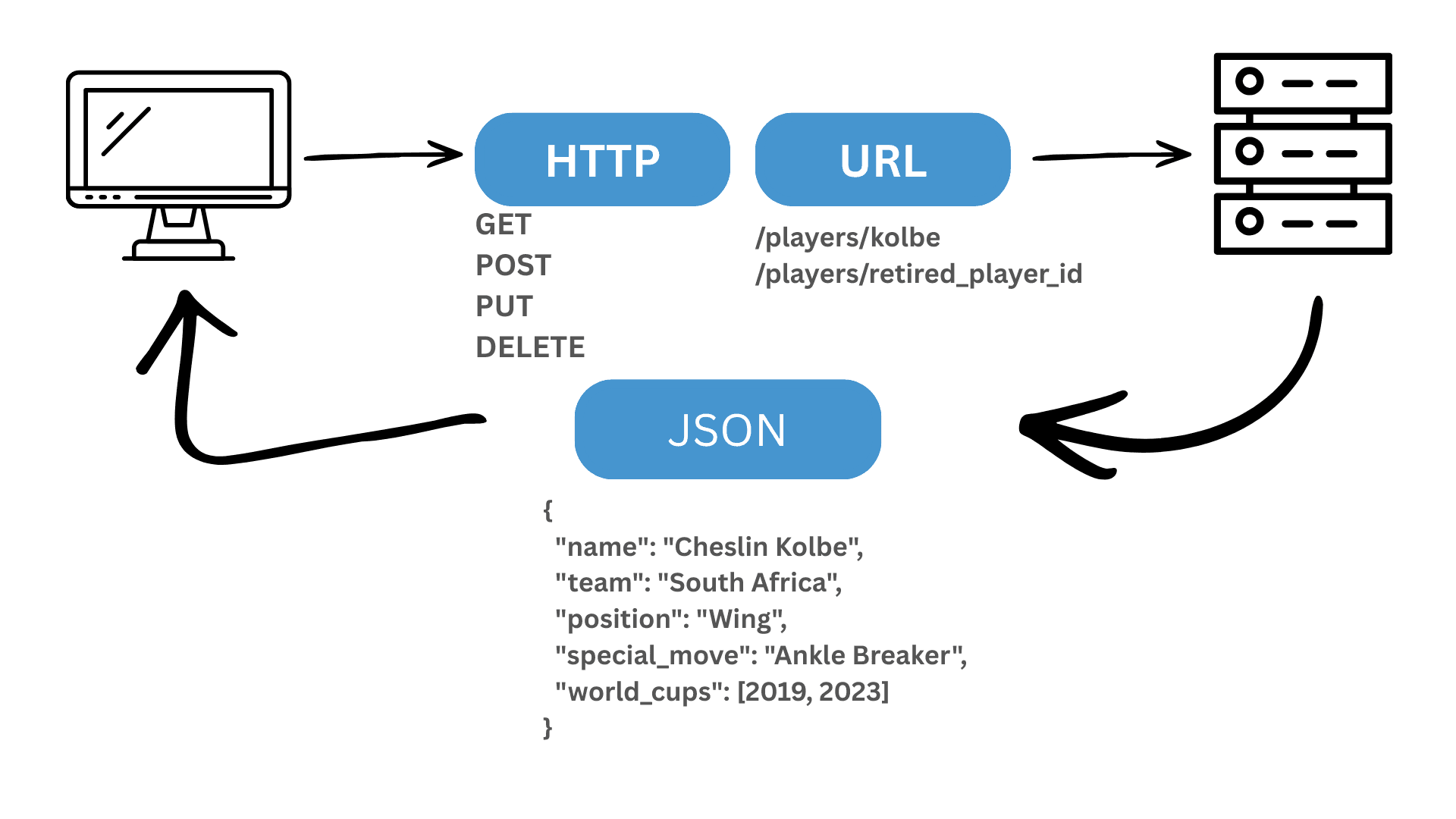
To interact with that player, REST allows a small set of actions called HTTP methods. These are the legal moves of the game, defining what you can do with each resource.
GET – Scout Watching the Match
A GET request asks the server for information without changing anything. Think of it as a scout reviewing footage, observing without interfering.
import requests

# Get Cheslin Kolbe's stats
response = requests.get("https://tech-journeys.com/players/kolbe") #This URL doesn't really exist :)
player_data = response.json()
print(player_data)
Output
{
  "name": "Cheslin Kolbe",
  "team": "South Africa",
  "position": "Wing",
  "special_move": "Ankle Breaker",
  "world_cups": [2019, 2023]
}
POST – Adding a New Player
A POST request sends new information to the server to create something that does not yet exist. This is like officially adding a new player to the squad.
new_player = {
    "name": "Canan Moodie",
    "team": "South Africa",
    "position": "Centre",
    "world_cups": [2023]
}

response = requests.post("https://tech-journeys.com/players", json=new_player)
print(response.status_code)  # 201 means created
PUT – Updating a Player
A PUT request replaces or updates an existing resource. For example, updating a player’s position after a tactical change.
updated_position = {
    "position": "Fullback"
}

response = requests.put("https://tech-journeys.com/players/kolbe", json=updated_position)
print(response.status_code)  # 200 means success
DELETE – Removing a Player
A DELETE request removes a resource completely. This is like a permanent substitution.
response = requests.delete("https://tech-journeys.com/players/retired_player_id")
print(response.status_code)  # 204 means no content, successfully deleted
A Simple System Design View
System design is the process of planning and organising all the parts of a software system so it works reliably, efficiently, and can handle real-world use. You can think of it as designing a rugby stadium and playbook: you need to know where everything goes, how players move, and how referees, coaches, and spectators interact.
For a REST API, the high-level view looks like this:
[Client] ----------> [REST API Server] ---------> [Database]
GET/POST/PUT/DELETE                               CRUD operations
Client – could be a web app, mobile app, or Python script.
REST API Server – receives requests, enforces rules (HTTP methods), and manages resources.
Database – stores the resources like players, matches, and stats.
Good system design ensures your API behaves predictably, scales well, and is easier to maintain, like a well-coached rugby team.
Looking at the Language of the Game: JSON
When a server responds, it doesn’t send pictures of Kolbe. It sends data.
That data is usually formatted as JSON, JavaScript Object Notation, a lightweight text-based structure designed to be easy for both humans and machines to read. JSON organises information into key-value pairs, much like a stat sheet in rugby.
Example of a player in JSON:
{
  "name": "Cheslin Kolbe",
  "team": "South Africa",
  "position": "Wing",
  "special_move": "Ankle Breaker",
  "world_cups": [2019, 2023]
}
Here, "name", "team", "position" "special_move" and "world_cups" are the keys, and the values describe the player.
API Security
You wouldn't just let anyone walk into the changing room, and you shouldn't just let anyone access your data. So make sure Security is always at the forefront.
Authentication and Authorisation
Authentication answers the question, who are you? It verifies identity. In APIs, this is commonly done using an API key or a JWT, JSON Web Token, which is a signed token proving identity for a limited time.
Python example:
import requests

headers = {"Authorization": "Bearer YOUR_JWT_TOKEN"}
response = requests.get("https://tech-journeys.com/players/kolbe", headers=headers)
print(response.json())
Authorisation answers the question, what are you allowed to do? Even after identity is confirmed, the system checks permissions. Just because you have a ticket to the stadium doesn’t mean you can sit in the coaching box (although it would’ve been nice listening to the mastermind Rassie himself). Both checks happen on every request.
Encryption
Data travelling between a client and a server must be protected. HTTPS uses TLS, Transport Layer Security, to encrypt communication. This ensures that if a "hacker" intercepts the data while it’s traveling between the Cape Town server and your phone, all they see is scrambled nonsense.
Rate Limiting
APIs must defend against overload. Rate limiting restricts how many requests a client can make in a given period, for example 100 requests per minute. This prevents abuse and protects the system from Denial-of-Service (DoS) attacks, which try to overwhelm servers by flooding them with traffic. You can think of it as crowd control at a sold-out international match, because without limits, the system would collapse under the pressure of too many requests.
The Approach I’ve Been Taking Throughout My Tech Career
I’ve found that the most complex systems become simple when you map them onto something you already understand. A GET request becomes observation, a POST request becomes a squad announcement, and security checks become permissions at the gate.
You don’t have to love rugby for this to work (it would’ve been great if you did 😉), but whatever your interest, whether it’s baking, soccer, classic cars, or gardening, map these API concepts to your world. Doing so moves the information from your short-term technical memory into long-term common sense, making it easier to recall and apply in real projects.